

How-To: Gift Subscriptions
1. Overview
Gift subscriptions allow one user (the giver) to purchase a subscription on behalf of another user (the recipient). The giver pays for the subscription, and the recipient receives access to the gated content.
Gift subscriptions support two fulfillment models:
- Direct fulfillment — The giver provides the recipient’s details at purchase time. The subscription is created immediately.
- Redemption code — The giver receives a unique code (e.g., GFT-DEMO-7X92K) that can be shared with the recipient. The recipient redeems the code to activate their subscription.
Both models integrate with the existing fulfillment reporting pipeline. Gift recipients appear in circulation reports, issue serve logs, and adds/removals tracking with full audit provenance.
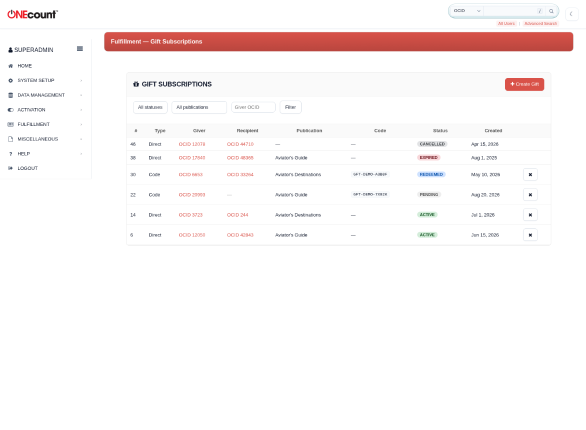
The Gift Subscriptions list showing direct gifts, redemption codes, and various statuses.
2. Gift Subscription Types
2.1 Direct Fulfillment
In the direct fulfillment model, the giver provides the recipient’s OCID (or the admin enters both OCIDs) at the time of purchase. The system immediately:
- Creates a subscription record (gcn_transactionlog) for the recipient
- Sets up the subscription expiration (gcn_el_expire)
- Links the gift relationship in the fulfillment_gift table
- Logs an adds/removals event with reason code GIFT_NEW
The recipient has immediate access to the gated content as soon as the gift is created.
In the screenshot above, gifts #6 and #14 are direct fulfillment examples — OCID 12050 gifted Aviator’s Guide to OCID 42843, and OCID 3723 gifted Aviator’s Destinations to OCID 244.
2.2 Redemption Code
In the redemption code model, the system generates a unique code with the prefix GFT- followed by alphanumeric characters (e.g., GFT-DEMO-7X92K). The code uses a character set that avoids ambiguous characters (no 0/O or 1/I).
The gift starts in “pending” status. No subscription is created until the recipient redeems the code. When redeemed:
- The recipient’s subscription is created
- The gift status changes to “redeemed”
- The redemption code is consumed and cannot be reused
- An adds/removals event is logged with reason code GIFT_REDEEMED
In the screenshot, gift #22 shows a pending code (GFT-DEMO-7X92K) awaiting redemption, while gift #30 (GFT-DEMO-A3B8F) has been successfully redeemed by OCID 33264.
Redemption codes can have an expiration date. If the code expires before redemption, the gift status changes to “expired” and the code becomes invalid.
3. Creating a Gift Subscription
3.1 From the Admin UI
Navigate to Fulfillment › Gift Subscriptions in the admin sidebar. Click the red “Create Gift” button to open the creation modal.
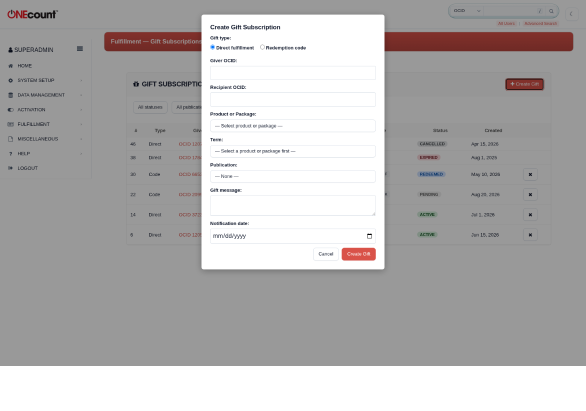
The Create Gift modal with gift type, giver/recipient fields, and product-or-package selection.
Fill in the following fields:
| Field | Required | Description |
| Gift type | Yes | Direct fulfillment or Redemption code |
| Giver OCID | Yes | The OCID of the person paying for the gift |
| Recipient OCID | Direct only | The OCID of the person receiving the gift |
| Package | Yes | Select a product or package from the dropdown (grouped by type) |
| Term | Yes | Select the term — options cascade based on the selected product or package |
| Publication | No | The fulfillment publication (for magazine gifts) |
| Gift message | No | Personal message from giver to recipient |
| Notification date | No | Date to send notification email to recipient |
| Code expires | Code only | Expiration date for the redemption code |
3.2 Product/Package and Term Selection
The “Product or Package” dropdown is organized into two groups: Products (individual resources from site_resources) and Packages (bundles from fe_groups). When you select either a product or a package, the Term dropdown automatically updates to show only the terms that belong to that selection, along with their prices.
This means standalone products that are not part of any package are now accessible, alongside traditional package-based subscriptions.
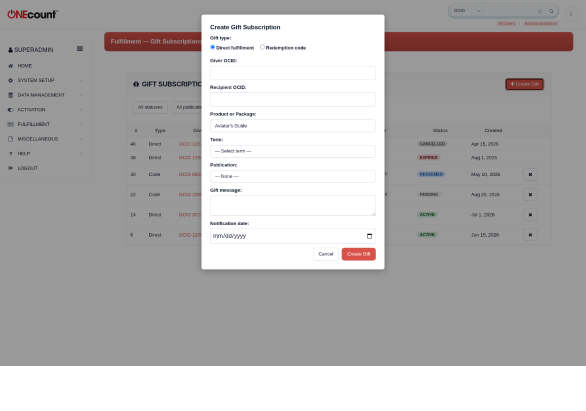
After selecting “Aviator’s Guide” from the Products group, the Term dropdown shows its three terms with prices.
3.3 Via Stripe Payment
When a Stripe Payment includes gift metadata (gift_type, recipient_ocid, gift_message), the webhook handler automatically creates the gift subscription on successful payment. This enables front-end checkout flows to offer gift subscriptions without additional backend work.
4. Redemption Codes
To redeem a gift code, use the gift-redeem AJAX endpoint or the admin UI. The process requires:
- The redemption code (case-insensitive)
- The recipient’s OCID
The system validates that the code exists, is in “pending” status, and has not expired. If validation passes, the recipient’s subscription is created and the gift status updates to “redeemed.”
Each redemption code can only be used once. After redemption, the code is removed from the fast-lookup table in Cassandra.
5. Managing Gifts
The Gift Subscriptions page (Fulfillment › Gift Subscriptions) provides a filterable list of all gifts. Filters include:
- Status (pending, active, redeemed, expired, cancelled)
- Publication
- Giver OCID
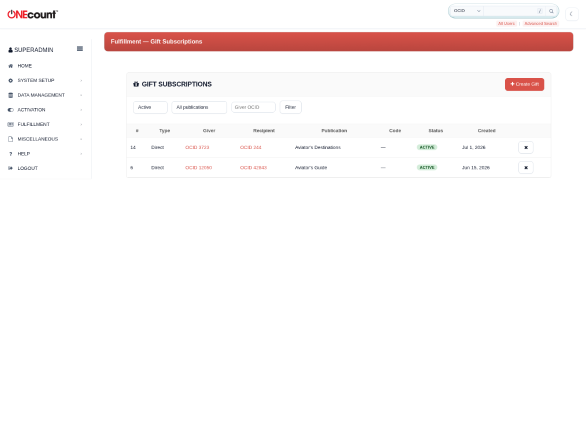
The gift list filtered to show only active subscriptions.
Available actions:
| Action | Description |
| Cancel | Cancels the gift. If the recipient has an active subscription, it is noted in the audit trail with reason code GIFT_CANCELLED. |
| Renew | Extends the subscription for another term. Either the giver or recipient can renew (see Renewal Flow). |
6. Renewal Flow
Gift subscriptions support renewal by either party:
6.1 Giver Renewal
A daily cron job (gift_renewal_notices.php) checks for gift subscriptions whose recipient’s subscription expires within a configurable window (default: 30 days). The giver receives a courtesy email with a renewal link. If the giver renews, the subscription extends and the gift record is updated with renewed_by = “giver.”
6.2 Recipient Fallback
If the giver does not renew within a configurable fallback window (default: 14 days before expiry), the recipient enters the standard renewal/dunning series. If the recipient renews, the gift record is updated with renewed_by = “recipient.” The gift relationship is preserved for audit trail purposes.
7. Gift Notifications
Gift notifications are email messages sent to the recipient at a scheduled date. When creating a gift, the giver can specify a notification_date (e.g., a birthday or holiday).
The daily cron job (gift_notifications.php) processes pending notifications and marks them as sent. Email delivery integration uses the platform’s existing email service.
8. Reporting
Gift subscriptions are fully integrated with fulfillment reporting:
| Report | How Gifts Appear |
| RPT-01 (Circulation by Issue) | Gift recipients are counted in their classification bucket (paid_print, paid_digital_replica, etc.) based on the term format. Optional subscription_source breakdown shows gift vs. individual counts. |
| RPT-09 (Adds & Removals) | Gift-specific reason codes (GIFT_NEW, GIFT_REDEEMED, GIFT_EXPIRED, GIFT_CANCELLED) appear automatically in the reason code grouping. |
| RPT-19 (Mail File) | Gift recipients with valid addresses appear in the mail file. The serve log includes gift_id and subscription_source columns for provenance. |
| Issue Builder | Gift recipients appear in saved lists like any subscriber. They have real subscriptions. |
9. Setup & Configuration
Navigate to Fulfillment › Setup › Gift Settings to configure:
| Setting | Default | Description |
| Enable gift subscriptions | Off | Master toggle for the gift feature |
| Default code expiry (days) | 90 | How long redemption codes remain valid |
| Giver renewal notice (days) | 30 | Days before expiry to send giver a renewal notice |
| Recipient fallback (days) | 14 | Days before expiry to enter recipient into standard renewal series |
10. Permissions
Gift subscription management requires the FULFILLMENT_GIFT_MANAGE permission module. Superadmin users (user_type = “F”) automatically have access.
The FULFILLMENT_VIEW permission is sufficient to see the gift list (read-only). Creating, cancelling, and renewing gifts requires FULFILLMENT_GIFT_MANAGE.