

How-To: Recurring Billing & Continuous Service
1. Overview
ONEcount supports continuous-service (auto-renew) subscriptions via Stripe's recurring billing infrastructure. When enabled, Stripe automatically charges the subscriber's card at the end of each billing cycle. ONEcount receives webhook notifications and updates the subscriber's status accordingly.
This guide covers how to configure auto-renewal, what happens when payments succeed and fail, how the dunning (retry) process works, and how cancellations are handled.
2. Configuring Auto-Renewal
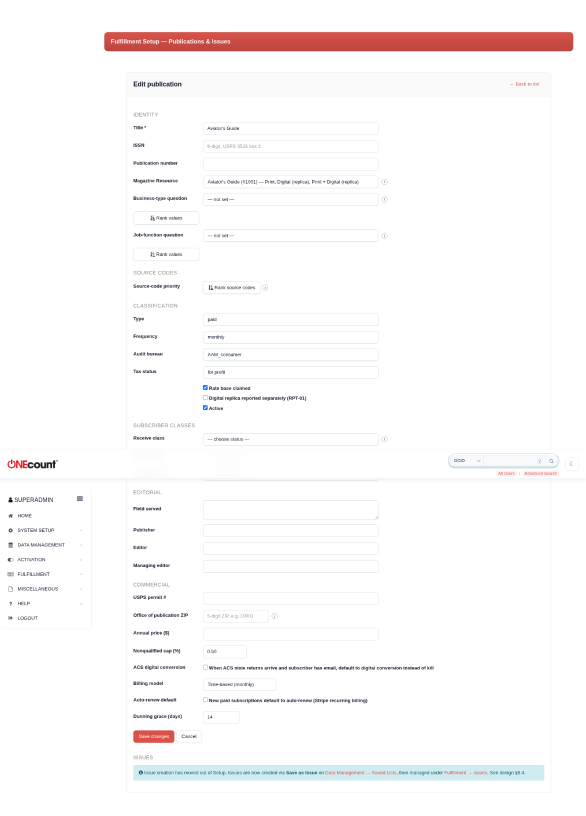
Auto-renewal is configured per publication in Fulfillment Setup.
2.1 Publication settings
Navigate to Fulfillment, then Setup, then Publications. Edit the publication and look for the billing section at the bottom of the form:
- Billing model — 'Time-based' means the subscription renews on a calendar interval (e.g., every 12 months). 'Issue-based' means the subscription renews per issue cycle. Most publications use time-based.
- Auto-renew default — when checked, new paid subscriptions for this publication are automatically set up with a Stripe recurring subscription. The subscriber's card is charged at the end of each billing cycle without manual intervention.
- Dunning grace days — how many days after a failed payment before the subscriber's access is fully suspended. During this window, Stripe retries the charge using Smart Retries. Default is 14 days.
2.2 How the billing interval is determined
The billing interval is derived from the term's AccessDuration field (in months). Examples:
- Print Annual (12 months) — Stripe charges once per year.
- Print Semi-Annual (6 months) — Stripe charges every 6 months.
- Digital Monthly (1 month) — Stripe charges every month.
The initial charge happens when the subscriber first pays (via web checkout or admin phone order). Stripe schedules the next charge based on the interval.
3. The Renewal Lifecycle
3.1 Successful renewal
When Stripe successfully charges the subscriber's card at the billing cycle boundary:
- Stripe fires an invoice.paid webhook to ONEcount.
- ONEcount extends the subscription expiration date by the term duration (e.g., +12 months for an annual term).
- The subscriber's status is set to Active Qualified.
- A renewal payment event is logged to the payment history.
- A transaction row is written to gcn_transactionlog for backward compatibility with existing reports.
The subscriber does not need to take any action — renewal is fully automatic.
3.2 Failed payment (dunning)
When Stripe's charge attempt fails (insufficient funds, expired card, bank decline):
- Stripe fires an invoice.payment_failed webhook to ONEcount.
- ONEcount transitions the subscriber to Credit Suspends status. The subscriber remains in this state while Stripe retries.
- Stripe's Smart Retries automatically attempt the charge again on an optimized schedule (typically 3-4 attempts over 7-14 days). You configure the retry behavior in the Stripe Dashboard under Settings, then Billing, then Smart Retries.
- If a retry succeeds, Stripe fires invoice.paid and ONEcount restores the subscriber to Active Qualified. The dunning is resolved.
- If all retries are exhausted, Stripe cancels the subscription and fires customer.subscription.deleted (see below).
3.3 Subscription cancelled
A subscription can be cancelled in three ways, each resulting in a different subscriber status:
- Subscriber requests cancellation (via admin or self-service) — the subscriber transitions to Requested Suspends. The reason code in the adds/removals log is CANCELLED_SUBSCRIBER.
- Payment retries exhausted (Stripe cancels after failed dunning) — the subscriber transitions to Expire Suspends. The reason code is CANCELLED_NONPAYMENT.
- Admin cancels from the Stripe Dashboard directly — the subscriber transitions to Expire Suspends.
In all cases, the cancellation is logged to the adds/removals audit trail. The subscriber is removed from active circulation for fulfillment reporting purposes.
4. Subscriber Status Transitions
The recurring billing system uses these status transitions:
- Active Qualified → (payment fails) → Credit Suspends — subscriber is in dunning. Stripe is retrying.
- Credit Suspends → (retry succeeds) → Active Qualified — dunning resolved, subscriber restored.
- Credit Suspends → (retries exhausted) → Expire Suspends — subscription cancelled for non-payment.
- Active Qualified → (subscriber cancels) → Requested Suspends — voluntary cancellation.
All transitions are logged to the fulfillment status change history and the adds/removals audit trail. RPT-09 (Additions & Removals) reports these transitions under the appropriate categories.
5. Managing Subscriptions
5.1 Viewing a subscriber's billing status
Each subscriber's Stripe customer ID and payment methods are stored in ONEcount. The payment history (charges, renewals, refunds, failures) is available in the payment_event tables and will appear in the admin subscriber detail view.
5.2 Processing a refund
Refunds can be processed from the Stripe Dashboard (Payments, find the charge, click Refund). When you refund a charge, Stripe fires a charge.refunded webhook and ONEcount logs the refund in the payment event history. Partial refunds are supported.
5.3 Updating a subscriber's card
If a subscriber's card expires or they want to use a different card, you can process a new payment via the admin Payment Entry page. The new card will be stored and set as the default payment method for future recurring charges.
6. Troubleshooting
Subscriber is in Credit Suspends but should be active
Check the Stripe Dashboard for the subscription status. If the payment was resolved (e.g., the subscriber updated their card in Stripe's hosted portal), verify that the invoice.paid webhook was received. Check the webhook log in Stripe Dashboard under Developers, then Webhooks, then the endpoint's event log.
Subscriber cancelled but still shows Active
If a subscription was cancelled with 'at period end' (the default), the subscriber remains active until the end of their current billing period. The cancellation takes effect at renewal time. Check the Stripe subscription's cancel_at_period_end flag.
Renewal charged the wrong amount
The renewal amount is set when the Stripe Subscription is created (based on the term price at the time of initial purchase). If the term price has changed since, existing subscriptions continue at the original price. To update the price, modify the subscription in the Stripe Dashboard or cancel and re-subscribe at the new price.
7. Where to Learn More
- Stripe Billing documentation: stripe.com/docs/billing
- Stripe Smart Retries: stripe.com/docs/billing/revenue-recovery/smart-retries
- Stripe Payments How-To: docs/fulfillment/howto-stripe-payments/
- Revenue Recognition & Financial Export How-To: docs/fulfillment/howto-revenue-export/
- Publication setup (billing model, auto-renew): docs/fulfillment/howto-magazine-setup/