

How-To: USPS Form 3526
Annual Statement of Ownership, Management, and Circulation
1. Overview
USPS Form 3526, the Statement of Ownership, Management, and Circulation, is a federal requirement for any publication mailed under a Periodicals permit. The form must be filed annually, typically in October, and a copy must be printed in the publication itself. Form 3526 reports ownership information, management details, and a breakdown of circulation for a single issue nearest to the filing date, along with average circulation over the preceding twelve months.
The ONEcount Fulfillment module generates Form 3526 via RPT-10. RPT-10 collects the required data from the publication record, the issue serve lists, and subscriber classification data, then produces a formatted PDF that mirrors the official USPS form and a plain-text version suitable for print-in-magazine reproduction.
Form 3526 is independent of the AAM filing cadence. You file it once per year regardless of whether the publication is AAM-audited, and regardless of how many AAM reporting periods fall within the year.
2. Before You Start
Complete the following checklist before running RPT-10. Missing any of these prerequisites will result in incomplete or inaccurate output.
- At least one issue must be finalized (RPT-19 complete). RPT-10 requires a finalized issue as the basis for its single-issue circulation figures. Ideally, the issue whose mail date is nearest to the filing date should be finalized.
- Geographic data must be loaded and current. RPT-10 breaks circulation into in-county, outside-county-domestic, and international categories. This requires that subscriber addresses include valid country and state/county codes. If geographic data is missing, the breakdown will be incomplete.
- The publication's office_of_publication_zip must be set. This ZIP code determines the county of the office of publication, which is used to calculate in-county vs. outside-county circulation (Form 3526 Items 15a and 15b).
- Publisher, editor, and managing editor information must be current on the publication record. These populate Items 8, 9, and 10 of the form. If any of these fields are blank, RPT-10 will flag a warning.
- Owner and security holder information should be up to date. These populate Items 11 and 12. While RPT-10 will run without them, the resulting form will be incomplete for USPS filing purposes.
- Your user account must have the fulfillment.run and fulfillment.statement_file permissions.
3. RPT-10: USPS Form 3526 — Step by Step
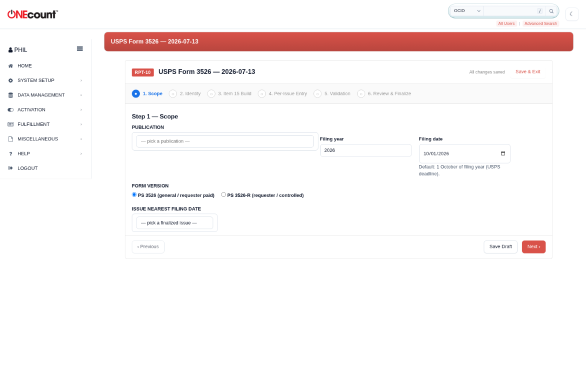
RPT-10 is a six-step wizard. Navigate to Fulfillment, then Reports, then RPT-10 USPS Form 3526.
Step 1: Scope
Select the publication and the filing date. The filing date is the date you intend to file Form 3526 with the USPS, typically a date in October. The wizard uses this date to determine which issue is nearest to the filing date (for single-issue figures) and to calculate the twelve-month lookback window (for average figures). Verify that the publication and date are correct, then click Next.
Step 2: Issue
The wizard identifies the finalized issue whose issue date is nearest to the filing date and presents it as the proposed single-issue basis. This is the issue whose circulation data will appear in the "No. Copies of Single Issue Published Nearest to Filing Date" column. If the proposed issue is not the one you want (for example, if a more recent issue is available but was not yet finalized when the wizard ran), you can select a different finalized issue from the dropdown. Click Next.
Step 3: Header (Items 1-12)
This step displays the ownership and management information that will populate Items 1 through 12 of the form. The data is pre-filled from the publication record:
- Item 1: Publication title.
- Item 2: Publication number.
- Item 3: Filing date (from Step 1).
- Item 4: Issue frequency and number of issues published annually.
- Item 5: Number of issues published annually and annual subscription price.
- Item 6: Complete mailing address of known office of publication.
- Item 7: Complete mailing address of headquarters or general business office of publisher.
- Item 8: Full name and complete mailing address of publisher.
- Item 9: Full name and complete mailing address of editor.
- Item 10: Full name and complete mailing address of managing editor.
- Item 11: Owner names and addresses (all stockholders holding 1% or more of total stock).
- Item 12: Known bondholders, mortgagees, and other security holders.
Review every field. You can edit the values on this screen for this filing only (changes here do not update the publication record). If you need to make permanent corrections, cancel the wizard, update the publication record in Setup, and restart. Click Next when all fields are correct.
Step 4: Compute (Items 13-16)
The wizard computes the circulation figures that populate Items 13 through 16 of the form. This is an automated step. The wizard reads the serve lists from all finalized issues in the twelve-month lookback window, classifies each subscriber by type (paid vs. requested/controlled) and geography (in-county, outside-county domestic, international), and calculates both the single-issue counts and the twelve-month averages.
The computation typically takes a few seconds. When it finishes, the wizard displays a summary showing the total paid/requested circulation, free/nominal outside-county, free/nominal in-county, other classes mailed through USPS, free distribution outside the mail, total free distribution, total distribution, copies not distributed, and total. Review these numbers and click Next.
Step 5: Review
The full form is displayed for review, showing both the single-issue column and the average column side by side. Each line item is editable. Use the override fields to make per-issue adjustments if needed — for example, if you know the exact number of copies not distributed from physical inventory counts rather than using the computed estimate.
Overrides are highlighted in yellow so you can distinguish computed values from manual entries. Add a note in the override reason field to document why the override was made. Click Next when the form is ready for export.
Step 6: Export
Two output formats are available:
- PDF: a formatted reproduction of USPS Form 3526, suitable for printing, signing, and mailing to the USPS. This is the primary filing artifact.
- TXT: a plain-text version of the Statement of Ownership suitable for reproduction in the publication itself. The USPS requires that the Statement of Ownership be printed in the first issue published after the filing date.
Click Finalize to lock the filing. This requires the statement_file permission. Once finalized, the RPT-10 run becomes read-only.
4. Reading the Output
Form 3526 Item 15 is the core circulation table. Understanding each line is essential for verifying the output before filing.
4.1 Item 15a: Total Number of Copies
The net press run — the total number of copies produced for the issue. In ONEcount's context, this equals the total serve list count plus any copies not distributed (waste, office copies, spoilage). If you do not track press run separately, this defaults to the serve list count.
4.2 Item 15b: Paid and/or Requested Circulation
Broken into sub-items: (1) mailed outside-county paid subscriptions, (2) mailed in-county paid subscriptions, (3) paid distribution outside the mail (carriers, dealers, vendors), and (4) paid distribution by other classes of mail. The sum of these sub-items is total paid and/or requested circulation.
4.3 Item 15c: Total Paid Distribution
The sum of all paid sub-items from 15b.
4.4 Item 15d: Free or Nominal Rate Distribution
Broken into sub-items for free/nominal rate outside-county, free/nominal rate in-county, free/nominal rate copies mailed at other classes through USPS, and free/nominal rate distribution outside the mail.
4.5 Item 15e: Total Free or Nominal Rate Distribution
The sum of all free/nominal rate sub-items from 15d.
4.6 Item 15f: Total Distribution
The sum of total paid (15c) and total free (15e).
4.7 Item 15g: Copies Not Distributed
Copies produced but not distributed — office use, leftover, spoiled, returns from news agents. If you do not track this, the field defaults to zero.
4.8 Item 15h: Total
Total distribution (15f) plus copies not distributed (15g). This should equal Item 15a (total number of copies).
4.9 Percent Paid
Calculated as total paid (15c) divided by total distribution (15f), expressed as a percentage. The USPS requires Periodicals to maintain at least 50% paid circulation to qualify for Periodicals rates. If the percent paid falls below 50%, the USPS may revoke the Periodicals permit.
5. Print-in-Magazine Notice
The USPS requires that the Statement of Ownership be published in the first regular issue after the filing date. RPT-10 Step 6 generates a TXT artifact that contains a preformatted print-ready version of the Statement.
To use the TXT artifact:
- Download the TXT file from the RPT-10 artifacts list.
- Open the file in a text editor and verify that all data is correct.
- Copy the entire content into your editorial production system (InDesign, Quark, or your CMS's print layout tool).
- Format it according to your publication's style. The content must remain unchanged, but you may adjust font, size, and layout to fit your page.
- Place it in the issue that will be the first regular issue published after the filing date.
- Verify the placement in page proofs before going to press.
If the Statement is not published in the required issue, the USPS may impose penalties including revocation of the Periodicals permit.
6. Filing with USPS
Form 3526 can be filed by mail or electronically. Choose the method appropriate for your organization.
6.1 Filing by Mail
- Print the PDF artifact from RPT-10 Step 6.
- Have the publisher or authorized representative sign the form on the signature line (Item 17).
- Mail the signed original to the postmaster at the post office where the publication is entered as Periodicals mail (the office of publication listed in Item 6).
- Retain a signed copy for your records.
6.2 Electronic Filing
If your local USPS Business Mail Entry Unit (BMEU) accepts electronic filings, you may submit the PDF via the USPS Business Mail gateway. Check with your local postmaster for availability and specific submission procedures. Electronic filing still requires a digital or wet-ink signature on the form.
6.3 Deadline
Form 3526 must be filed annually. The USPS does not specify a fixed calendar deadline; instead, the requirement is that the form be filed within the month prescribed by the publication's entry post office (typically October for most Periodicals). Failure to file may result in suspension of Periodicals mailing privileges.
7. Common Issues
7.1 Geographic Data Unavailable
If RPT-10 Step 4 reports that geographic data is unavailable or incomplete, check that subscriber addresses in the serve list include valid country and state codes. Missing geographic data prevents the wizard from classifying circulation into in-county, outside-county, and international categories. Correct the address data in ONEcount, re-close the affected issue via RPT-19, and re-run RPT-10.
7.2 All Circulation Shows as Outside-County
This usually means the office_of_publication_zip is not set or is set to an incorrect value. The wizard uses this ZIP code to determine the county of the office of publication, which is the basis for the in-county vs. outside-county split. Navigate to Setup, then Publications, and verify that office_of_publication_zip is correct. After correcting it, re-run RPT-10.
7.3 No Finalized Issues Available
RPT-10 requires at least one finalized issue. If no issues are available in Step 2, go to the Issues list, identify the issue closest to the filing date, and complete the RPT-19 issue close workflow for it. Then restart RPT-10.
7.4 Rate Discrepancies Between Single Issue and Average
Large differences between the single-issue column and the average column can be legitimate (seasonal publications, growth or decline trends) but may also indicate data quality issues. If the single-issue total is dramatically different from the average, review the individual issue serve lists for the past twelve months to identify outliers. Common causes include duplicate records on a serve list, an issue that was closed with test data, or a saved list query that was modified between issues.
7.5 Publisher/Editor Fields Are Blank
RPT-10 Step 3 will display warnings for any blank fields in Items 8 through 12. These fields are required by the USPS. You can fill them in on the Step 3 screen for this filing only, or cancel the wizard, update the publication record in Setup to make the corrections permanent, and restart RPT-10.